MagicPay Memory fill
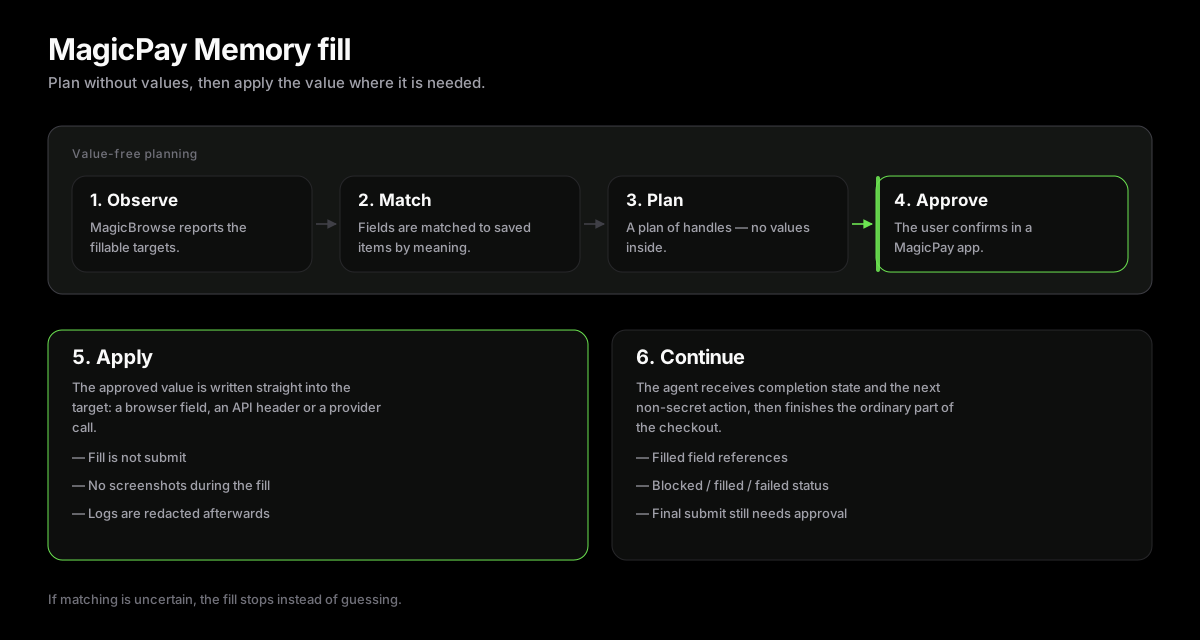
MagicPay Memory fill is the step where approved values are written into a target — such as a browser checkout field for card, login, identity, or confirmation — without ever entering the LLM context.
- MagicPay Memory plan/apply workflow for fields the agent must not see.
- LLM-first semantic matcher maps observed fields to Memory handles and request inputs.
- Masks protected fields and blocks screenshots while protected values are applied.
- Returns completion state to the agent, not raw secrets in model-visible context.
Why It Exists
Browser agents are vulnerable to prompt injection and visual leakage. MagicPay Memory fill enforces the MagicPay rule that protected values never enter the agent prompt, page screenshot stream, or ordinary browser action log when the user chooses the MagicPay path.
Host Browser Bridge
The host browser analyzes the form and supplies exact targets. MagicPay resolves protected handles and MagicFill applies only those supplied targets.
import { planFill, applyFill } from '@nuanu-ai/magicpay-sdk/fill-plan-apply'; // Value-free plan over observed targets, semantic matches, and the handle catalog.const plan = await planFill({ sessionId, targetSet, // fingerprint + observed fillable targets targetMatches, // LLM-first semantic field matches memoryCatalog, // handles only, no raw secrets}); // applyFill writes through your guarded targetWriter and never submits, pays,// or books. Values are materialized only inside this trusted writer.const result = await applyFill({ plan, currentTargetState: { fingerprint: targetSet.fingerprint, targets: targetSet.targets }, materializeValue, targetWriter,});Semantic Field Matching
Field matching uses an LLM-first semantic matcher. If matching is unavailable, invalid, or uncertain, Memory fill fails closed and stops instead of guessing.
Security Model
MagicPay Memory fill is designed around a narrow guarantee: protected values do not enter the agent prompt, screenshots, action logs, or stored run records. The browser agent can tell that a protected field exists, but the value is resolved by MagicPay and applied through a guarded fill path.
- Screenshots and page captures are banned while a protected value is being applied and immediately after the fill unless the runtime can guarantee masking or redaction before model ingestion.
- Protected forms are masked from the agent: the model can see field purpose, target refs, labels, and status, but not passwords, card values, document numbers, OTPs, private keys, or other Memory values.
- After a Memory fill, later observations, prompts, debug text, and stored run records do not echo the submitted values.
- Debug and log output is redacted so it does not echo submitted values or other sensitive keys.
- Memory fills use short-lived artifacts. The match and fill results carry refs, field keys, filled status, and summaries rather than raw values.
- Ambiguous protected forms, missing targets, unavailable artifacts, unsupported field groups, invalid date or expiry values, and low-confidence assistive fills block instead of guessing.
Form Masking
The Memory fill path treats the form as a hard stop for the agent. built-in browser first observes fillable targets and submit targets, then MagicPay Memory fill builds a value-free plan from semantic field matches. After approval, values are applied directly to the target fields by the guarded writer. Follow-up observations and run records are redacted with the exact-value profile, so the agent can continue from completion state without reading back the submitted secrets.
| Surface | What the agent can see | What stays protected |
|---|---|---|
| Before approval | Field purpose, label, target ref, page URL, and requested action. | Stored secret values and request artifacts. |
| During fill | Request status and whether the protected operation is blocked, filled, or failed. | Raw artifact values and browser field contents. |
| After fill | Filled field refs, completion state, and next required non-secret actions. | Exact submitted values in observations, logs, screenshots, and prompts. |
Operational Rules
MagicPay Memory fill only works if the surrounding runtime respects the same stop rule. Browser agents should stop at login, identity, payment, and final confirmation fields, let MagicPay handle the protected values, then refresh visible page state and continue only with required non-secret fields. Final submit, purchase, booking, terms acceptance, or account changes still require the appropriate user approval.
- Do not ask the user to paste protected values into chat.
- Do not route request artifacts through the LLM or ordinary tool logs.
- Do not fill optional newsletter, marketing, promo, survey, or analytics fields after Memory fill.
- Do not submit, book, buy, accept terms, or change account data unless that exact action was approved.
- Treat a compromised browser, host, or agent runtime as outside this SDK-level guarantee; MagicPay Memory fill narrows LLM exposure but cannot protect against code execution on the fill host.