SDK Purchase Flow
Your own agent can search, browse, and reason independently, then call MagicPay SDK to resolve a protected value or run a protected payment action.
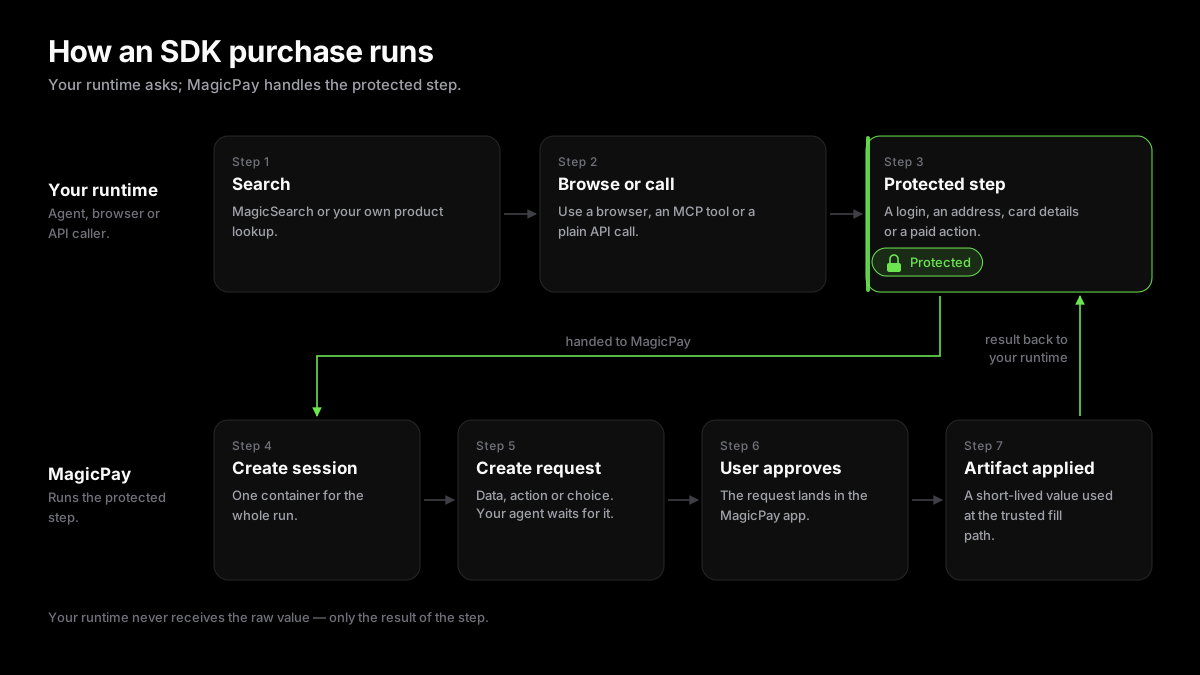
When To Use The SDK
Use the SDK when your application already owns the surrounding agent, browser, worker, or MCP tool and needs a typed MagicPay client for sessions, requests, data resolution, and actions.
Flow
Your agent runs until it reaches a protected step — payment, login, identity, confirmation — then hands only that step to MagicPay.
- Create or reuse a MagicPay workflow session.
- Create a data, action, or choice request with a stable client request id.
- Wait for user approval or supplied data.
- Use the returned artifact only in the trusted browser or provider call.
- Resume the agent workflow after MagicPay reports the result.
Minimal SDK Shape
A typical purchase uses sessions, data resolution, action execution, and result waiting.
const { session } = await client.sessions.create({ type: 'payment' }); // The agent never sees raw data; it asks for a value or a use-approval.const handle = await client.memory.createRequest(session.id, input);const result = await client.memory.waitForResult(session.id, handle);