MagicPay Memory
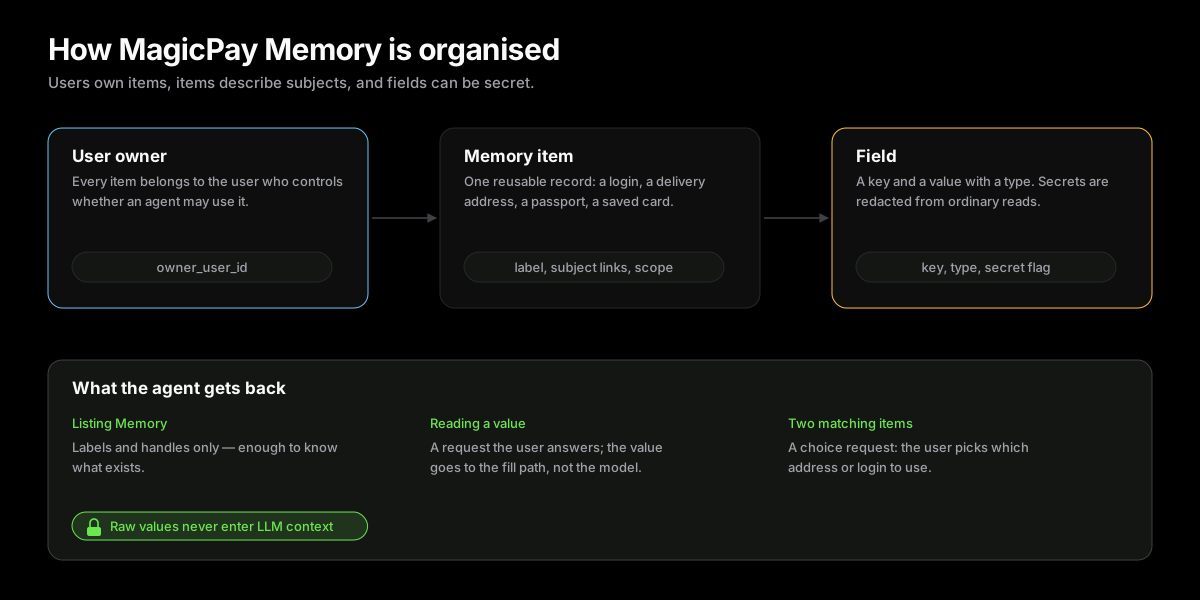
MagicPay Memory stores user-owned items and protected fields so agents can request the right data during a workflow without seeing raw values.
- Secure data storage designed for personal AI agents, not a prompt memory system.
- Items group related fields and can identify the person or organization they belong to.
- Users can manage data directly, while agents can request or save approved data during work.
- Memory reads go through MagicPay requests and MagicPay Memory fill instead of LLM context.
Agent Memory Storage
MagicPay Memory is the user-data layer for personal AI agents. It stores reusable facts and secrets in a user-bound model, so an agent can ask for the right data at the right moment without asking the user to paste passwords, identity details, card values, or addresses into chat. Users can create and edit records from the UI. Agents can request records during a checkout, ask the user for missing data, and save approved values for future sessions.
Items, Subjects, And Fields
The current storage model is intentionally small: the user owns each Memory item, an item groups related fields, and optional subject links record who or what the item is about. A subject link can distinguish the user, a spouse, another traveler, or an organization when that context was explicitly saved. This supports requests such as “buy tickets for me and my wife” without claiming a separate identity graph or inferring relationships that the user did not provide.
type MemoryItem = { id: string; owner_user_id: string; display_label: string; status: 'active' | 'pending' | 'revoked' | 'deleted'; subject_links: Array<{ subject_ref: string; role?: string }>; scope: Array<Record<string, unknown>>; fields: MemoryField[]; availability: Record<string, unknown>;};Entries
An entry is a reusable Memory item: login, identity document, payment method, wallet, address-like identity data, or another saved record. A user can have several entries with overlapping fields. If a checkout needs a delivery address and several address entries match, MagicPay should ask a choice request instead of guessing. The selected entry becomes the source for that session, and the user can save new entries when an agent discovers missing information along the way.
type MemoryField = { name: string; label: string; hint?: string | null; value_type?: 'date' | 'phone_number' | 'person_name' | 'country'; is_secret: boolean;};Fields
A field is a key-value pair with a label, type, requirement flag, sensitivity, and optional semantic tags. Fields can appear in several entries: date of birth can exist on a basic identity entry, a passport entry, and a driver license entry. MagicPay Memory keeps this flexible by separating schema definitions from values and by enforcing a sensitivity floor for hard-secret keys such as passwords, card numbers, CVV, document numbers, private keys, seed phrases, and dates of birth.
| Field property | Meaning | Example |
|---|---|---|
| key | Stable machine key used by agents and form matching. | date_of_birth |
| label | Human-readable label shown to the user. | Date of birth |
| type | Value type used by editors and validation. | text, secret, date, email, url |
| sensitivity | Whether the field is marked secret. | secret flag |
| semantic_tags | Hints for secure matching and Memory fill. | document_number, password |
Choice Requests
When more than one entry can satisfy a request, MagicPay Memory should hand the decision to the user. For example, a user may have a home address, an office address, and a hotel address; the agent should not infer which one to use for the current checkout. A choice request can show the safe labels and summaries, let the user pick the right entry, and optionally collect a note that helps the agent continue.
- Use choice requests when multiple identities, addresses, documents, or payment-related entries match.
- Show safe summaries rather than raw values.
- Persist the selected entry only when the user explicitly chooses to save or reuse it.
Agent Access
Agents reach MagicPay Memory through requests and tools, never through direct database access. Listing Memory returns safe labels and handles so the agent can understand what exists without seeing raw values. Creating or updating Memory requires user approval. Reading Memory values happens through a MagicPay request flow and returns a short-lived artifact for the trusted fill or provider call.
const items = await tools.list_memory_items();const editableAddress = items.find((item) => item.label === 'Hotel delivery address' && item.readOnly !== true); await tools.create_memory_item({ label: 'Hotel delivery address', scope: [{ kind: 'site', value: 'merchant.example' }], fields: [{ name: 'postal_code', value: '10001', hint: 'Hotel delivery postal code' }],});Out-of-context Read
When a protected value is requested and approved, the goal is that the orchestrating LLM never receives the raw value. The agent asks for a field, MagicPay resolves the request, and MagicPay Memory fill or another trusted runtime applies the value in the browser, in an API call, or in a provider call. The value is transmitted as Memory request material and decrypted only where it has to be applied. The agent receives status, selected item, field keys, and completion state, not the value itself.
- Do not paste protected values into chat.
- Do not log, summarize, or store request artifacts in prompts.
- Use MagicPay Memory fill for browser forms so protected values bypass LLM context.
- Use provider or API calls for non-browser flows when a backend can complete the action directly.
Security And Storage
MagicPay Memory is user-bound and permissioned through MagicPay. Memory records keep open metadata separate from protected values, and they can point to provider-backed records such as provider-issued payment cards instead of copying them. Identity data that comes from the KYC flow stays provider-sourced: MagicPay references the verification result rather than storing every verified field itself. The rule that matters: raw protected values never reach model context, and they are released only through approved requests.
- Open fields can support matching and user-visible summaries.
- Protected fields are redacted from ordinary list and get responses.
- Provider-backed records can store references instead of copying provider-owned secrets.
- Revoked Memory items remain unavailable to agents until re-enabled by the user.
Extensible Schemas
The model is intentionally flexible. Today the registry includes login, identity, identity document, provider-backed payment card, and wallet schemas. New entries can add fields and semantic tags without changing how agents request data. This lets MagicPay Memory act as a secure store for ordinary checkout data now and expand toward richer personal and organizational identity graphs over time.
type MemoryField = { key: string; label: string; type: 'text' | 'secret' | 'date' | 'number' | 'email' | 'url'; required: boolean; secret: boolean; semantic_tags?: string[];};Save During Workflows
MagicPay Memory can be populated before a session from UI, or during a session when the user supplies missing data. Session-time writes should be explicit so the user understands what identity, entry, and fields will be reusable later.
- Reusable Memory facts can be convenient, but sensitive values belong in Memory items.
- Provider-backed card items are synced from provider state rather than manually edited.
- Artifacts should not be logged, stored in prompts, or reused after the protected step.